
Add Contact Interaction
Create interaction property
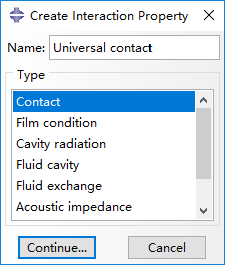
First, we create the type of interaction we want to model. In the model tree, double click on Interaction Properties and create a new property of the type Contact, named 'Universal contact'.
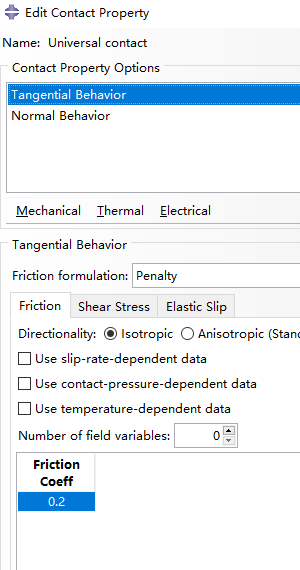
Add Mechanical > Tangential Behavior from the dropdown menu, and set friction coefficient as 0.2 (this parameter is of little importance).
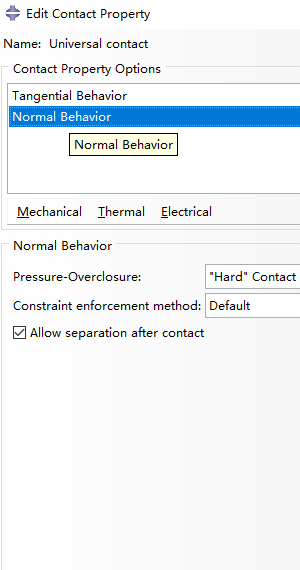
Next, add Mechanical >Normal Behavior as shown below.
Create interaction
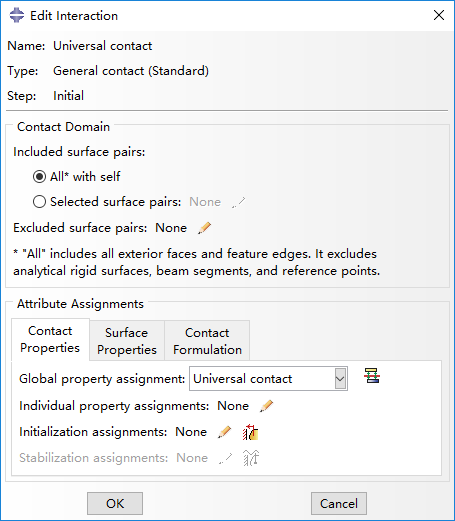
Then create an interaction named 'Universal contact', beginning from step 'Initial' with type of General contact (Standard).
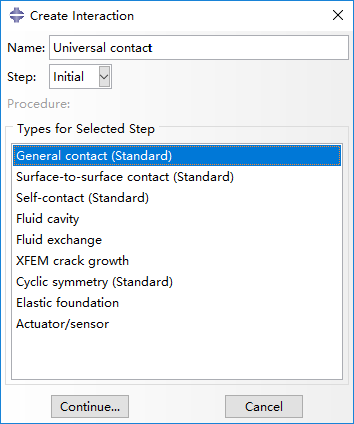
Last, edit interaction by selecting All* with self for included surface pairs, Universal contact for global property assignment in Contact Properties panel.
Bibliography
Jiang et al. (2016) Design and Simulation Analysis of a Soft Elastomer Manipulator based on Honeycomb Pneumatic Networks.
Sun et al. (2016) FLEXIBLE HONEYCOMB PNEUNETS ROBOTS.
Jiang et al. (2017) A Two-Level Approach for Solving the Inverse Kinematics of an Extensible Soft Arm Considering Viscoelastic Behavior.
Jiang et al. (2016) Design and Simulation Analysis of a Soft Manipulator Based on Honeycomb Pneumatic Networks.
Giri et al. (2010) Continuum robots and underactuated grasping
Grissom, et al. (2006) Design and experimental testing of the OctArm soft robot manipulator.
Contributors
Hao Jiang
Zhanchi Wang
Xinghua Liu
Xiaotong Chen
Yusong Jin
Hao Sun
Xiaoping Chen