
Create Steps
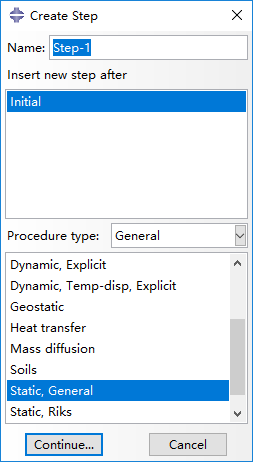
In this page, we create two steps, 'Step-1' and 'Step-2' for load simulations. 'Step-1' is created with procedure type of Static, General.
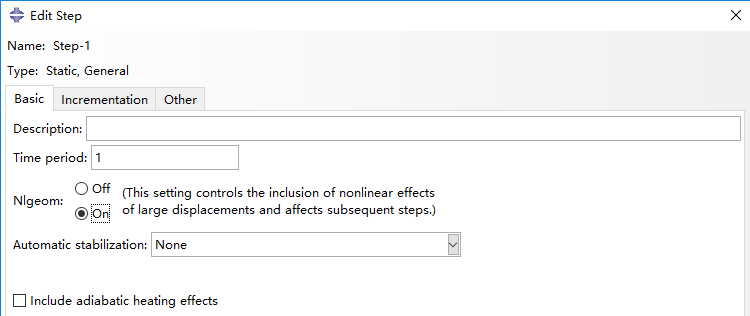
In the next window, turn on Nlgeom option in Basic panel.
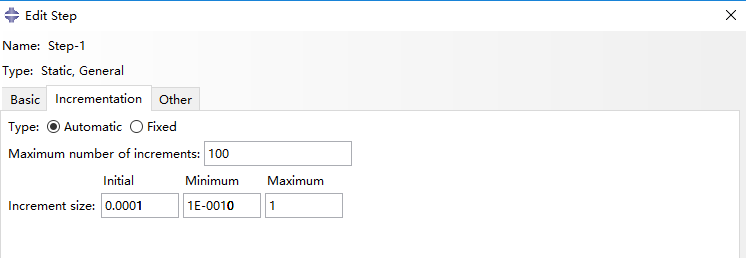
In Incrementation panel, we select type as Automatic, set Maximum number of increments as 100, and set Increment size as 0.0001, 1e-10 and 1 respectively for Initial, Minimum and Maximum.
Next, 'Step-2' is created after 'Step-1', also with procedure type of Static, General.
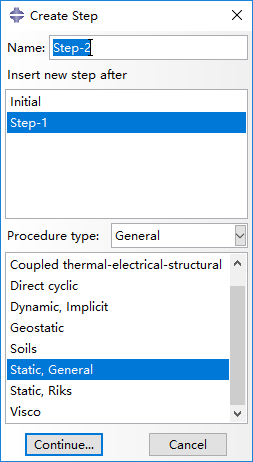
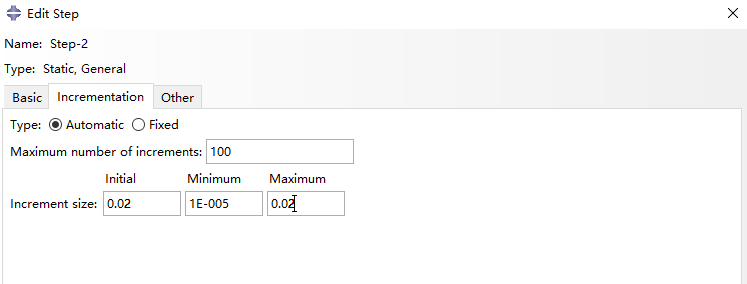
'Step-2' also needs enabled Nigeom in Basic panel. In Incrementation panel, we select type as Automatic, set Maximum number of increments as 100, and set Increment size as 0.02, 1e-5 and 0.02 respectively for Initial, Minimum and Maximum. Notice that the Maximum increment size of 0.02 here is set for convenience of the result analysis afterwards.
Bibliography
Jiang et al. (2016) Design and Simulation Analysis of a Soft Elastomer Manipulator based on Honeycomb Pneumatic Networks.
Sun et al. (2016) FLEXIBLE HONEYCOMB PNEUNETS ROBOTS.
Jiang et al. (2017) A Two-Level Approach for Solving the Inverse Kinematics of an Extensible Soft Arm Considering Viscoelastic Behavior.
Jiang et al. (2016) Design and Simulation Analysis of a Soft Manipulator Based on Honeycomb Pneumatic Networks.
Giri et al. (2010) Continuum robots and underactuated grasping
Grissom, et al. (2006) Design and experimental testing of the OctArm soft robot manipulator.
Contributors
Hao Jiang
Zhanchi Wang
Xinghua Liu
Xiaotong Chen
Yusong Jin
Hao Sun
Xiaoping Chen